Back to Blog
 DesignRevision Editorial
· SaaS, frontend & developer tooling
DesignRevision Editorial
· SaaS, frontend & developer tooling
Neon vs Supabase 2026: Benchmarks, Pricing & Verdict
DesignRevision Editorial
· SaaS, frontend & developer tooling
•
Updated August 18, 2026
•
15 min read
Human Written
Share:
Every Postgres decision in 2026 comes down to the same question: do you want a database, or do you want a backend?
That question used to have a clean answer.
Neon was the database.
Supabase was the backend.
But two things changed.
Databricks acquired Neon in a deal announced May 2025, reportedly around $1 billion.
And in July 2026, Neon shipped a backend suite of its own: managed auth, object storage and functions, all in beta.
So the clean split is blurring.
Not gone, but blurring.
Here's where the two actually stand today, with the pricing checked against both vendors' live pages rather than a comparison written eighteen months ago.
Key Takeaways
If you remember nothing else:
- Neon is owned by Databricks since 2025. It still runs standalone with its own free tier and pricing
- Neon shipped auth, object storage and functions in July 2026, all in beta and free during beta. The "Neon is only a database" framing is out of date
- Neon still has no realtime. That's the clearest remaining gap against Supabase
- Neon's plans are Free / Launch / Scale, not Pro. Launch is usage-based at $0.106/CU-hour and $0.35/GB-month, typical spend around $15/mo
- Supabase replaced PgBouncer with Supavisor in late 2023. Any comparison still saying PgBouncer is over two years stale
- Vercel Postgres no longer exists. Vercel retired it and moved those databases to Neon in December 2024
- Neon branching is instant and copy-on-write. Supabase branching is migration-based and bills at $0.01344/branch-hour plus compute
Table of Contents
- Quick Comparison
- What Changed
- Architecture: Two Different Approaches to Postgres
- Pricing: The Real Numbers
- Database Branching
- Performance and Cold Starts
- Connection Pooling for Serverless
- Features Beyond the Database
- Framework Integration
- The Decision Framework
- Conclusion
Quick Comparison
| Feature | Neon | Supabase |
|---|---|---|
| Best for | Serverless Postgres, branching, many small projects | Full-stack backend, auth, realtime |
| Owner | Databricks (acquired 2025) | Independent |
| Architecture | Separated storage and compute | Dedicated Postgres with bundled services |
| Free tier | 100 projects, 0.5 GB and 100 CU-hrs each, 10 branches | 500 MB DB, 1 GB files, 50K MAU, 2 active projects |
| Free tier catch | Compute suspends after 5 min | Projects pause after 1 week idle |
| Paid entry | Launch, usage-based, ~$15/mo typical | Pro $25/mo, extra projects from $10/mo |
| Compute rate | $0.106/CU-hour (Launch) | Micro $10/mo to 16XL $3,730/mo |
| Storage | $0.35/GB-month | 8 GB included on Pro, then $0.125/GB |
| Auth | Managed Better Auth (beta) | Built-in, GA (JWT, social, RLS) |
| Realtime | None | Built-in WebSockets |
| Object storage | Beta, free during beta | Built-in with CDN, GA |
| Functions | Beta | Deno-based, GA |
| Branching | Instant copy-on-write | Migration-based, $0.01344/branch-hour |
| Pooling | Native serverless driver | Supavisor |
Quick verdict: Neon is the better database and is becoming a plausible backend. Supabase is the more complete platform today, and everything in it is generally available rather than beta.
What Changed
Three developments matter, and every one invalidates something you'll read in older comparisons.
Databricks bought Neon
Announced May 14, 2025, at a reported ~$1 billion.
Neon continues to operate standalone with its own free tier, pricing and console.
Should you care?
Worth factoring in if you're picking a database to live with for years.
Acquisitions change roadmaps, and Neon's positioning now sits inside a data and AI platform rather than a pure developer-tools company.
Nothing has broken for existing users, but "who owns this" is a fair question to ask before you commit a production database to it.
Neon shipped a backend
In July 2026 Neon announced Managed Better Auth, Neon Object Storage and Neon Functions, plus an AI Gateway.
All in beta, available on all projects, free during the beta, and explicitly not feature-complete.
Neon says pricing will be published before general availability.
So "Neon is purely a database, bring your own auth" is no longer accurate.
But read the status carefully before you plan around it: beta, incomplete, and unpriced.
And there's still no realtime.
Vercel Postgres was retired
Vercel Postgres is gone.
Vercel retired the product and migrated those stores to Neon in December 2024, and database integrations now run through the Vercel Marketplace, where Neon is one option among several.
And plenty of comparisons still list "powers Vercel Postgres" as a Neon advantage.
That product doesn't exist.
Architecture: Two Different Approaches to Postgres
Understanding the architecture explains every other difference you'll see here.
Neon: separated storage and compute
Neon rebuilt Postgres from the storage layer up, separating compute nodes from storage.
That separation is what enables the rest:
- Scale to zero: compute suspends after 5 minutes idle, so you pay nothing while nothing is happening
- Instant branching: copy-on-write storage creates branches by pointing at existing data instead of copying it
- Independent scaling: compute scales up to 16 CU on Launch and 56 CU on Scale without touching storage
A compute unit is roughly 1 vCPU with 4 GB RAM, so 56 CU gets you 224 GB RAM at the top end.
Supabase: Postgres as platform foundation
Supabase runs a dedicated Postgres instance and layers services on top:
- Auth handles JWT tokens, social logins and MFA
- Realtime pushes database changes over WebSockets
- Storage provides S3-compatible files with image optimisation
- Edge Functions run Deno-based serverless functions
The result is a Firebase-like experience on Postgres rather than NoSQL.
For a direct Firebase comparison, see our Firebase vs Supabase guide.
But the trade-off is coupling.
You get one dashboard and one bill, and you get less freedom in the database layer.
Pricing: The Real Numbers
This is where most comparisons of these two go wrong, because both platforms restructured their pricing.
Free tiers
| Resource | Neon Free | Supabase Free |
|---|---|---|
| Projects | 100 | 2 active |
| Database storage | 0.5 GB per project | 500 MB |
| Compute | 100 CU-hrs/mo per project, up to 2 CU | Shared, 500 MB RAM |
| Idle behaviour | Suspends after 5 min | Project pauses after 1 week |
| Branches | 10 per project | Migration-based only |
| Auth users | Up to 60K MAU (beta) | 50,000 MAU |
| File storage | Beta, free during beta | 1 GB |
| Egress | 5 GB | 5 GB (plus 5 GB cached) |
| Team members | Unlimited | — |
Both are generous.
But they're generous at different things: Neon at running lots of small intermittent databases, Supabase at running one full-stack project properly.
That Supabase pause is worth flagging, because comparisons mention Neon's suspend and skip it.
A Supabase free project that sits untouched for a week stops until you wake it.
Paid plans
Neon uses usage-based pricing across three tiers:
| Plan | Typical spend | Compute | Storage | Max size |
|---|---|---|---|---|
| Free | $0 | 100 CU-hrs/project | 0.5 GB/project | 2 CU |
| Launch | ~$15/mo | $0.106/CU-hour | $0.35/GB-month | 16 CU |
| Scale | ~$701/mo | $0.222/CU-hour | volume-based | 56 CU |
Those "typical spend" figures are Neon's own, based on intermittent load with 1 GB for Launch and high load with 100 GB for Scale.
So your bill moves with whatever you actually use.
Supabase uses a plan fee plus compute add-ons:
| Plan | Price | Includes |
|---|---|---|
| Free | $0 | 2 active projects, pauses after 1 week idle |
| Pro | $25/mo | First project, 100K MAU, 8 GB disk, 250 GB egress |
| Team | $599/mo | SOC2, SSO, 14-day backups, 28-day logs |
| Enterprise | Custom | SLAs, BYO cloud |
Pro includes $10/mo in compute credits, which covers one Micro instance.
Additional projects start at $10/mo.
Overages run $0.00325/MAU, $0.125/GB disk, $0.09/GB egress, $0.0213/GB file storage.
Compute add-ons scale from Micro at $10/mo (1 GB RAM, 200 pooled connections) up to 16XL at $3,730/mo.
What this means in practice
A side project that gets occasional traffic costs very little on Neon, because compute suspends between requests. On Supabase it costs $25/mo on Pro, or $0 on Free with the caveat that it pauses weekly.
A production SaaS with steady traffic converges. Supabase Pro at $25 includes auth, storage and realtime that you'd otherwise assemble. Neon's compute runs continuously under steady load, so scale-to-zero stops saving you anything.
Many small databases favour Neon heavily. 100 free projects against 2 active free Supabase projects isn't close.
I've deliberately not printed a total-cost-of-ownership table here.
Earlier versions of this article had one, and the numbers were invented.
Both platforms bill on enough independent axes (compute hours, storage, egress, MAU, branch hours, project count) that any single figure is a guess dressed up as analysis.
Database Branching
Branching is where the gap is widest, and it's still real.
Neon branching
Copy-on-write at the storage layer.
Creating a branch takes milliseconds and stores only the differences from the parent.
What that enables:
- A pull request gets an isolated database with production-like data
- Migrations run against a branch before touching production
- Preview deployments get their own database
- You test complex queries against real data without risk
Free includes 10 branches per project, Launch includes 25, and additional branches bill at $0.002 per branch-hour.
Supabase branching
Supabase creates a preview branch as a separate environment, then runs your migration files from Git and optionally seeds test data.
Supabase's own docs describe a branch as essentially a copy of your project minus the data.
And that's a meaningful difference for you:
- Provisioning takes seconds to minutes rather than milliseconds
- Branches start empty, so realistic testing needs seed data you maintain
- Branching bills at $0.01344 per branch-hour on Pro and Team, plus the compute, disk and egress the branch consumes
- Branch compute is billed separately, and your monthly compute credits don't cover it
The verdict on branching
For preview-deployment workflows, Neon wins clearly.
It's faster, cheaper per branch, and produces more realistic environments.
Supabase branching is fine for migration testing.
It just isn't the same feature.
Performance and Cold Starts
Neon
Compute resumes from suspension quickly thanks to the pageserver caching layer.
Once active, query performance matches standard Postgres, because the compute layer runs standard Postgres.
The trade you make is the first request after idle.
For production traffic that rarely triggers.
For side projects and dev databases, it's a fair price for zero idle cost.
Supabase
Supabase runs always-on Postgres on paid plans, so database queries have no cold start at all.
Edge Functions have their own cold start characteristics.
So for consistent traffic your latency is predictable, because nothing suspends.
To put real numbers on it, we pulled the slowest queries from one of our own Supabase Pro instances with pg_stat_statements:
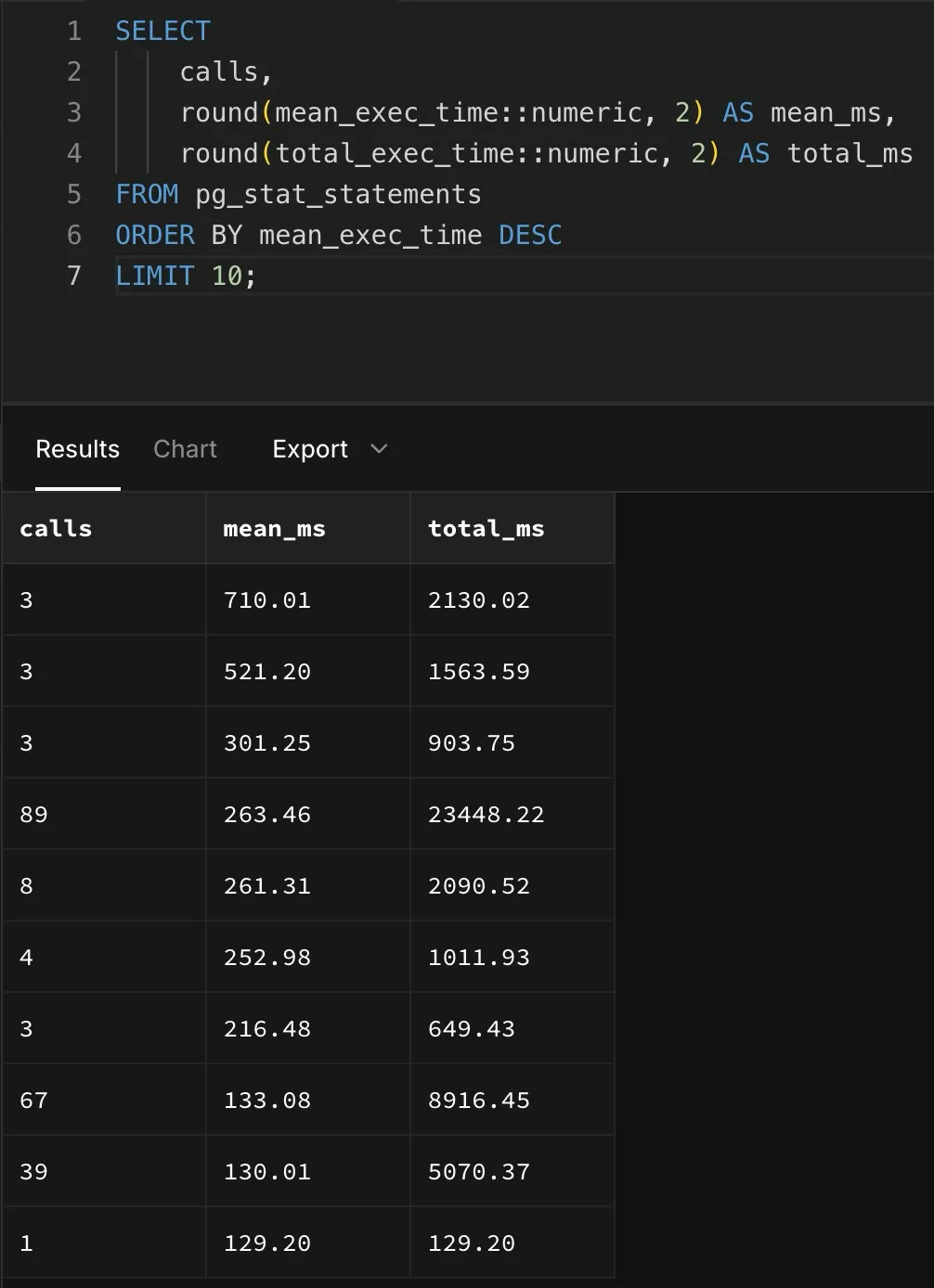
The 10 slowest query patterns on a real Supabase Pro (t4g.micro) instance, ordered by mean execution time. Read it honestly: this is the tail, not the norm. The 710 ms and 521 ms rows ran just 3 times each, one-off aggregations and reports, while the genuinely hot paths (89 calls and 67 calls) held at 263 ms and 133 ms mean. The lesson is that the slow queries here are ones you optimise at the application level with indexes and query shape. Supabase's always-on Postgres served the workload without platform-level latency surprises.
Performance verdict
Supabase wins for always-on workloads where consistent latency matters.
Neon wins for variable workloads where compute should follow demand.
For most applications the difference disappears after the first connection.
Connection Pooling for Serverless
Serverless functions open and close database connections constantly.
And without pooling you hit Postgres connection limits fast.
Neon ships a serverless driver (@neondatabase/serverless) built for exactly this. It uses WebSocket connections that handle the open/close cycle without separate pooling infrastructure, and it's tuned for Vercel Functions and Cloudflare Workers.
Supabase uses Supavisor, its own connection pooler written in Elixir. This is the correction worth making loudly: Supavisor replaced PgBouncer across all projects during late 2023, and PgBouncer was removed in early 2024.
You will still find comparisons published this year claiming Supabase runs PgBouncer.
It hasn't for over two years.
Pooled connection limits scale with instance size, from 200 on Micro up to several thousand on the larger tiers.
Both approaches solve the problem.
If you're choosing an ORM for either, our Prisma vs Drizzle comparison covers how each handles pooling.
Features Beyond the Database
This is the section that changed most, so treat older versions of it with suspicion.
Supabase, generally available
| Feature | Supabase | Neon |
|---|---|---|
| Authentication | GA: social logins, JWT, MFA | Managed Better Auth, beta |
| Realtime | GA: WebSocket subscriptions | None |
| File storage | GA: S3-compatible, CDN, transforms | Object Storage, beta |
| Edge functions | GA: Deno runtime | Functions, beta |
| Row-level security | Deep integration with auth context | Manual RLS with external tokens |
| AI gateway | — | Beta |
The honest read: Neon is building toward the same surface area, and in July 2026 it got most of the way there on paper.
But GA and beta are not the same commitment, beta pricing isn't published, and realtime is simply absent.
If realtime subscriptions are core to your product, that decides it for you.
What Neon offers that Supabase doesn't
| Feature | Neon |
|---|---|
| Instant branching | Copy-on-write, millisecond creation |
| Scale to zero | No compute cost when idle |
| Autoscaling compute | Up to 16 CU on Launch, 56 CU on Scale |
| Native serverless driver | WebSocket-based, no pooler needed |
| Project count | 100 on Free, 1,000+ on Scale |
So for database operations, CI/CD workflows and running many databases cheaply, Neon's design is a genuine advantage.
Framework Integration
Next.js and Vercel
Correct the record first: Vercel Postgres is not a product any more. Vercel retired it and migrated those databases to Neon in December 2024.
Database integrations now go through the Vercel Marketplace, where Neon sits alongside Supabase and others.
Neon still integrates well with Vercel.
The serverless driver fits the Functions model, and branch-per-preview-deployment is genuinely useful when you're iterating on schema.
If your app runs on Vercel or Railway, Neon slots in with little friction.
Supabase works well with Next.js too.
Its client library covers auth, storage and realtime in one place, at the cost of extra setup in Server Components and Server Actions compared with a plain Postgres connection.
Other frameworks
Both support anything that speaks Postgres.
Supabase's client libraries add real convenience for React Native, Flutter and Swift.
Neon's standard connection strings work everywhere without a platform-specific library.
The Decision Framework
Choose Neon if:
- You want serverless Postgres with autoscaling and scale-to-zero
- Branching for preview deployments is a priority
- You run many small or intermittent databases
- Cost optimisation for variable workloads matters
- You're comfortable with beta backend services, or bringing your own auth and storage
- You're building on a SaaS starter kit that already handles auth
Choose Supabase if:
- You want auth, storage, realtime and functions that are GA today
- Realtime subscriptions are core to your product
- You'd rather have one dashboard, one bill and one set of docs
- Predictable monthly pricing beats usage-based billing for your planning
- You're building mobile or multi-platform and want the client libraries
When to use both
Some teams run Neon as the primary database for branching and scale-to-zero, and use Supabase Auth standalone.
That's still a reasonable hybrid, though Neon's own managed auth may make it unnecessary once it leaves beta.
Ship apps faster with AI
Generate production-ready Next.js apps from a prompt. Full code ownership, deploy anywhere, stunning design output.

Conclusion
So which should you pick?
It isn't a question of which database is better.
It's which architecture fits what you're building.
Neon is the stronger Postgres platform: serverless scaling, instant branching, and a free tier that lets you run a hundred projects. It's now backed by Databricks and reaching toward a full backend, with auth, storage and functions in beta. The caveats are that beta means beta, pricing for those services isn't published, and there's no realtime.
Supabase is the more complete platform today. Auth, realtime, storage and edge functions are all generally available, priced, and documented. The trade-offs are always-on compute you pay for whether or not you use it, weaker branching, and a free tier that pauses after a week.
If you take one thing from this: check the date on any Neon vs Supabase comparison you read, including older versions of this one.
Vercel Postgres was retired, Supabase stopped using PgBouncer over two years ago, Neon renamed its plans and shipped a backend, and Databricks bought the company.
A comparison written before all that gets the conclusion right by accident at best.
That's a wrap.
Related Resources
- Supabase Pricing 2026: Free Tier Limits & Real Costs
- Firebase vs Supabase: Complete Developer Comparison
- Supabase Row Level Security: Policies That Actually Work
- Supabase MCP Server: AI Integration Guide
- Prisma vs Drizzle: Which ORM for Your Next.js Project?
- Vercel vs Railway: Best Deployment Platform for SaaS
- Best SaaS Starter Kits in 2026
- Best Auth Providers Compared: Clerk vs Auth0 vs Supabase vs Firebase
- Next.js Templates: 20 Best Options
- Stripe vs Paddle for SaaS: Payments Compared
Frequently Asked Questions
-
Neon is the better database. Supabase is still the more complete platform, though the gap narrowed in July 2026 when Neon shipped a backend suite in beta covering managed auth, object storage and functions. Choose Neon when you want serverless Postgres with instant branching and scale-to-zero compute, and you are comfortable with beta backend services or bringing your own. Choose Supabase when you want auth, file storage, realtime and edge functions that are generally available today, in one platform with one bill. Neon still has no realtime subscriptions, which is the clearest remaining gap.
-
Supabase Postgres is not truly serverless, so on paid plans you pay for always-on compute rather than scaling to zero. Database branching is migration-based rather than the instant copy-on-write branching Neon offers, and it bills at 0.01344 dollars per branch per hour on Pro and Team plus the compute the branch consumes, which compute credits do not cover. On the free plan, projects pause after a week of inactivity and you are limited to two active projects. Additional projects on Pro start at 10 dollars a month each. None are dealbreakers for most SaaS apps, but they matter for spiky workloads, heavy branching, or running many small projects.
-
It depends on your traffic pattern. Neon uses usage-based pricing with scale-to-zero compute after five minutes idle, so it is usually cheaper for side projects, spiky traffic and development databases that sit idle. Supabase uses predictable tiered pricing from 25 dollars a month on Pro, which is easier to forecast for always-on production apps. Neon Launch bills at 0.106 dollars per compute-unit-hour and 0.35 dollars per GB-month, with Neon quoting a typical spend around 15 dollars a month for intermittent load. For a database-only workload with variable traffic Neon usually wins. For a full backend with steady usage Supabase is competitive once you count the bundled auth, storage and realtime.
-
Both work well, but be careful with older advice here. Vercel Postgres no longer exists as a product: Vercel retired it and migrated those stores to Neon in December 2024, and database integrations now run through the Vercel Marketplace where Neon is one option among several. Neon still integrates cleanly with Vercel, its serverless driver suits the Functions execution model, and branch-per-preview-deployment is genuinely useful. Supabase works well with Next.js too and its client library covers auth and realtime, at the cost of extra setup in Server Components.
-
Neon uses a copy-on-write storage architecture that creates instant database branches from any point in time. When you create a branch, Neon stores only the differences from the parent, making branches cheap in storage and compute terms. Branches can be created through the console, CLI, or automatically for preview deployments. That means a pull request can get its own isolated database containing production-like data, without duplicating storage or affecting the parent. The Free plan includes 10 branches per project and Launch includes 25, with additional branches billed at 0.002 dollars per branch-hour.
-
They are generous in different directions. Neon Free gives you up to 100 projects, 0.5 GB storage and 100 compute-unit-hours per project, compute up to 2 CU, 10 branches, unlimited team members, and up to 60,000 monthly active users on its beta auth service. Supabase Free gives you 500 MB database, 1 GB file storage, 50,000 monthly active users, 5 GB egress and unlimited API requests, but pauses projects after a week of inactivity and caps you at two active projects. Supabase Free is better for a full-stack project you use regularly. Neon Free is better for many small or intermittent databases.
-
Yes. Both run standard PostgreSQL, so the database layer migrates with pg_dump and pg_restore in either direction. Neon publishes migration guides for Supabase users. Moving from Neon to Supabase means setting up Supabase auth, storage and realtime separately, since those are platform features rather than database contents. The same now applies in reverse for Neon backend services.
-
Neon ships a serverless driver that handles connections over WebSockets without external pooling infrastructure, which suits environments where connections open and close constantly. Supabase uses Supavisor, its own Postgres connection pooler written in Elixir, which replaced PgBouncer across all projects during late 2023 with PgBouncer removed in early 2024. Plenty of older comparisons still say Supabase uses PgBouncer, and that has not been true for over two years. Connection limits scale with your compute instance size, from 200 pooled connections on Micro up to several thousand on larger instances.
-
Supabase positions itself as an open-source Firebase alternative and covers most Firebase use cases: authentication with social logins and JWT, realtime subscriptions over WebSockets, file storage with image transforms, edge functions, and PostgreSQL instead of Firestore. The main difference is the data model. Supabase gives you a relational database with SQL and row-level security, where Firebase gives you document-based NoSQL. For teams that want a Firebase-like developer experience with the power of Postgres, Supabase is the closest equivalent.
RevKit
Next.js SaaS Starter Kit
Pre-built auth, billing, and dashboard. Launch your SaaS in days, not weeks.


Next.js 15
Supabase
Stripe
TypeScript
Join 50k+ subscribers
Web dev, SaaS, growth & marketing. Weekly.
Keep Learning
More articles you might find interesting.
