Back to Blog
 DesignRevision Editorial
· SaaS, frontend & developer tooling
DesignRevision Editorial
· SaaS, frontend & developer tooling
Supabase Pricing 2026: Free Tier Limits & Real Costs
DesignRevision Editorial
· SaaS, frontend & developer tooling
•
Updated July 2, 2026
•
21 min read
Human Written
Share:
Supabase has become the default backend for thousands of SaaS products, side projects, and startup MVPs. But the pricing page raises more questions than it answers. What do you actually pay? When does the free tier stop working? How fast do costs scale when your app takes off?
This guide breaks down every supabase pricing tier with exact numbers, real-world cost scenarios, and the hidden charges that catch developers off guard. Whether you are evaluating Supabase for a weekend project or a funded startup, this is the complete picture of what it costs in 2026.
Key Takeaways
If you remember nothing else:
- Supabase pricing follows a tiered model: Free ($0), Pro ($25/month), Team ($599/month), and Enterprise (custom)
- The free tier includes 500 MB database, 1 GB storage, and 5 GB bandwidth but pauses after one week of inactivity
- Pro plan is the sweet spot for most startups: $25/month base plus usage-based overages for storage, bandwidth, and compute
- Real-world costs for a SaaS with 50K users typically land between $100-$200/month on the Pro plan
- Supabase is 30-50% cheaper than Firebase for mid-scale applications and competitive with self-hosted Postgres when factoring in bundled services
- Watch for hidden costs: bandwidth overage ($0.09/GB), compute scaling, and multi-project sprawl ($25/project minimum)
Table of Contents
- Supabase Pricing Plans Overview
- Free Tier: What You Get and Where It Breaks
- Pro Plan: The SaaS Sweet Spot
- Team Plan: When You Need Enterprise Features
- Enterprise Plan: Custom Everything
- Supabase Storage Pricing Breakdown
- Supabase Edge Functions Pricing Breakdown
- Overage Charges: What Costs Extra
- Real-World Cost Scenarios
- Supabase vs Firebase vs Neon vs PlanetScale: Price Comparison
- Hidden Costs and Gotchas
- How to Optimize Your Supabase Cost
- Which Supabase Plan Should You Choose?
- Conclusion
Supabase Pricing Plans Overview
Supabase pricing plans follow a tiered model with usage-based overages on paid tiers. Here is the complete breakdown of what each plan includes.
| Feature | Free | Pro ($25/mo) | Team ($599/mo) | Enterprise |
|---|---|---|---|---|
| Database size | 500 MB | 8 GB (scales with compute) | 50 GB base (scales) | Custom |
| File storage | 1 GB | 100 GB | 100 GB | Custom |
| Bandwidth | 5 GB | 250 GB | 2 TB | Custom |
| Auth MAUs | 50,000 | 100,000 | 500,000 | Custom |
| Edge Function invocations | 500,000 | 1,000,000 | 1,000,000 | Custom |
| Realtime connections | 200 | 500 | 500 | Custom |
| Projects | 2 max | Unlimited | Unlimited | Unlimited |
| Backups | None | Daily (7-day retention) | Daily (custom retention) | Point-in-time |
| Support | Community | Priority | Dedicated | |
| SSO/SAML | No | No | Yes | Yes |
| SLA | None | None | None | 99.99% uptime |
The supabase pricing structure means costs scale gradually. You are not hit with a cliff when upgrading. The Pro plan includes $10 in compute credits, and overages are billed based on actual usage rather than pre-provisioned capacity.
Free Tier: What You Get and Where It Breaks
The supabase free tier is generous enough to build and test a complete application but restrictive enough that you will outgrow it before going to production.
Supabase Free Tier Limits
The Supabase free tier (as of July 2026) includes a 500 MB database, 1 GB file storage, 5 GB egress, 50,000 monthly active users, 500,000 edge-function invocations, and up to 2 active projects — with no backups, SLA, or SSO, and projects paused after 7 days of inactivity.
Here are the exact supabase free tier limits, and what happens when you cross each one:
| Resource | Free Tier Limit | What Happens When Exceeded |
|---|---|---|
| Database | 500 MB | Write operations rejected |
| File storage | 1 GB | Upload operations blocked |
| Bandwidth | 5 GB/month | Requests return errors |
| Auth MAUs | 50,000 | New signups blocked |
| Edge Functions | 500,000 invocations/month | Invocations throttled |
| Realtime connections | 200 concurrent | New connections refused |
| Realtime messages | 2 million/month | Messages dropped |
| Projects | 2 per organization | Cannot create new projects |
| Compute | Shared CPU, 500 MB RAM | No upgrade available |
The most impactful limit is the automatic project pausing. Free tier projects that receive no API requests for one week are paused automatically. Your data is retained, but the project goes offline until you manually resume it. For anything user-facing, this is a dealbreaker.
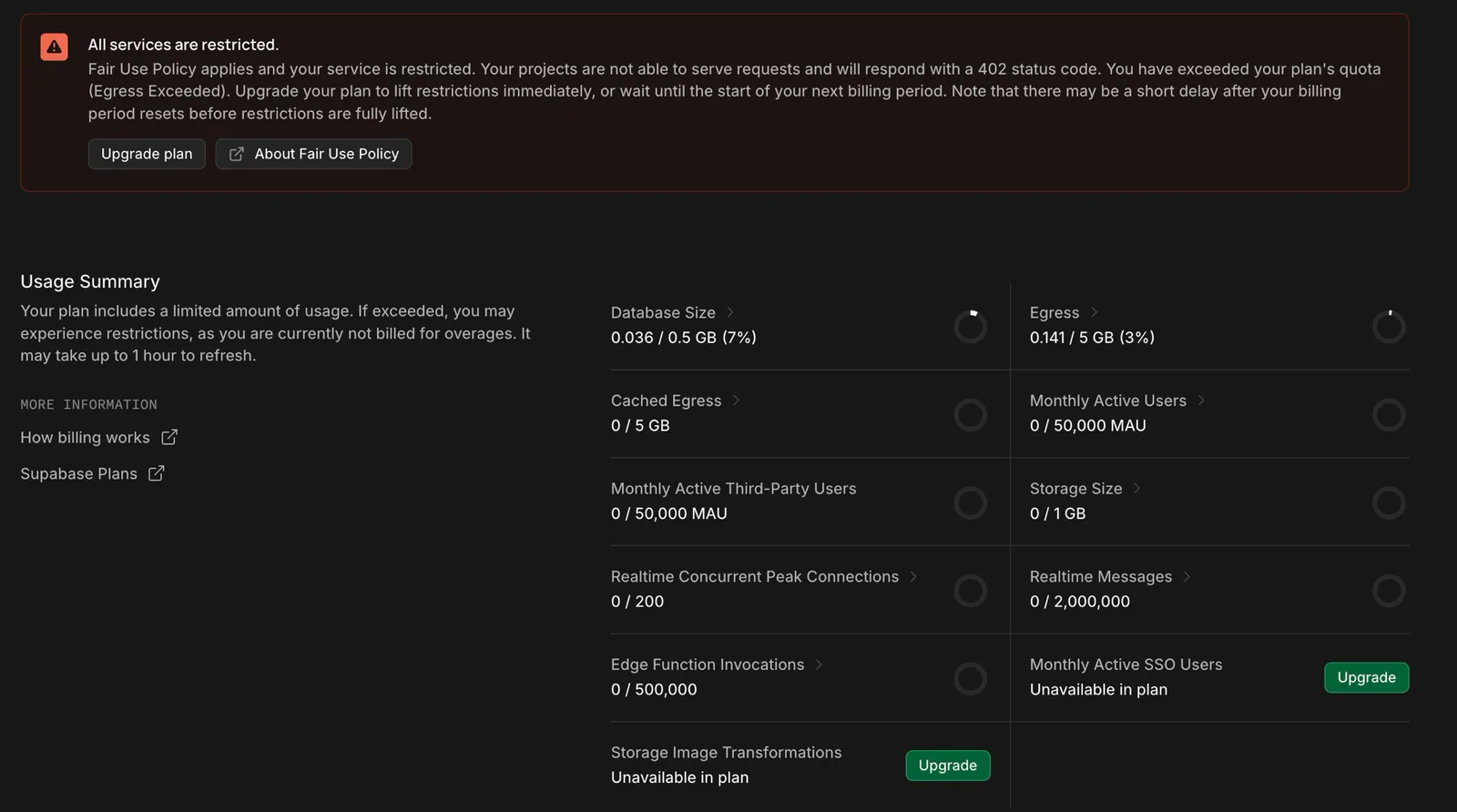
From one of our own free-tier projects: cross a limit like egress and Supabase applies its Fair Use Policy — every service stops serving requests and returns a 402 until you upgrade or the billing period resets. (The usage meters can take up to an hour to catch up, which is why egress reads low here even though the restriction is active.)
When the Free Tier Works
The supabase free tier is ideal for:
- Learning and prototyping. Build your first Supabase project, experiment with Row Level Security, test realtime subscriptions, and learn the platform without spending anything
- Personal tools. Apps only you use where occasional pausing is acceptable
- MVPs with under 1,000 users. If you are validating an idea and can tolerate the limits, the free tier gets you to first feedback
- Staging environments. Test deployments alongside your production Pro instance
When the Free Tier Breaks
The free tier becomes unreliable when:
- Your database exceeds 500 MB (most SaaS apps hit this within months)
- You need guaranteed uptime (pausing kills trust with users)
- You have more than 200 concurrent connections (common for apps with realtime features)
- Bandwidth consumption grows beyond 5 GB per month (one image-heavy app can blow through this in days)
- You need daily backups (the free tier has none)
If you are building a product you plan to charge for, the Pro plan is the minimum viable backend. The supabase cost of $25 per month is less than what you would spend on a single dinner, and it eliminates the constraints that could embarrass you in front of early users.
Pro Plan: The SaaS Sweet Spot
The Pro plan at $25 per month is where most SaaS products should start. It removes the critical limitations of the free tier and adds usage-based scaling so your supabase pricing grows with your revenue.
What Pro Includes
- 8 GB database that scales with compute add-ons
- 100 GB file storage with $0.021/GB overages
- 250 GB bandwidth with $0.09/GB overages
- 100,000 Auth MAUs with $0.003375 per additional MAU
- 1 million Edge Function invocations with $2.50 per additional million
- 500 concurrent realtime connections with overage charges
- $10 compute credits included monthly
- Daily backups with 7-day retention
- Email support
- Unlimited projects (each billed at $25/month minimum)
Pro Plan Pricing Math
The $25 base is just the starting point. Here is how supabase cost builds on the Pro plan for a typical SaaS application:
| Component | Included in $25 | Overage Rate |
|---|---|---|
| Compute | $10 credit (shared CPU) | $0.01344/hour for 2 vCPU/4 GB RAM |
| Database storage | 8 GB | $0.125/GB-month |
| File storage | 100 GB | $0.021/GB-month |
| Bandwidth (egress) | 250 GB | $0.09/GB |
| Auth MAUs | 100,000 | $0.003375/MAU |
| Edge Functions | 1M invocations | $2.50/million |
| Realtime | 500 connections | $0.015/1,000 peak connections |
For a SaaS with 20,000 MAUs, 10 GB database, 50 GB storage, and 100 GB bandwidth, the monthly bill stays close to the $25 base because everything falls within included limits. This is why the Pro plan is the sweet spot: it covers the needs of most startups without surprise charges.
Team Plan: When You Need Enterprise Features
The Team plan at $599 per month targets organizations that need compliance features, higher limits, and priority support. The jump in supabase pricing from $25 to $599 is significant, so understanding when it makes sense is critical.
What Team Adds Over Pro
| Feature | Pro | Team |
|---|---|---|
| Base bandwidth | 250 GB | 2 TB |
| Auth MAUs included | 100,000 | 500,000 |
| Log retention | 1 day | 28 days |
| Support | Priority | |
| SSO/SAML | Not available | Included |
| Custom roles | Not available | Included |
| SOC 2 | Not available | Included |
When to Upgrade to Team
Upgrade to the Team plan when:
- You need SSO/SAML. Enterprise customers require single sign-on. This alone can justify the cost if you are selling to companies with security requirements
- Auth MAUs exceed 100,000. At $0.003375 per additional MAU on Pro, 500,000 MAUs would cost $1,350 in overages. The Team plan includes 500,000 MAUs for $599
- Bandwidth exceeds 1 TB regularly. The jump from 250 GB to 2 TB included makes Team cheaper than Pro with heavy bandwidth overages
- You need compliance certifications. SOC 2 and extended log retention are Team-only features
- Your team needs priority support. Response times matter more as your customer base grows
The supabase pricing break-even point between Pro and Team typically hits when your Pro bill consistently exceeds $400 per month in overages, or when you need enterprise features that Pro simply does not offer.
Enterprise Plan: Custom Everything
The Enterprise plan is negotiated directly with Supabase and targets organizations with specific compliance, performance, and support requirements.
Enterprise includes everything in Team plus:
- 99.99% uptime SLA backed by service credits
- Dedicated support engineer with custom response times
- HIPAA compliance for healthcare applications
- Custom limits negotiated to your workload
- VPC peering for network isolation
- Point-in-time recovery for database backups
- Custom contracts and invoicing
If your application processes sensitive data in regulated industries, the Enterprise plan is not optional. The compliance features, SLA guarantees, and dedicated support justify custom pricing that typically starts in the thousands per month.
Supabase Storage Pricing Breakdown
Supabase storage pricing is straightforward but adds up faster than most developers expect, especially for applications that handle user-uploaded files, images, or documents.
| Tier | Storage Included | Overage Rate |
|---|---|---|
| Free | 1 GB | Not available (uploads blocked) |
| Pro | 100 GB | $0.021/GB-month |
| Team | 100 GB | $0.021/GB-month |
Real Storage Cost Examples
- Profile images app (10,000 users, 200 KB average): 2 GB total storage. Fits within Pro included limits. No overage
- Document management SaaS (1,000 users, 50 MB average): 50 GB total. Fits within Pro included limits
- Image-heavy marketplace (5,000 listings, 5 MB average): 25 GB storage but bandwidth is the real cost driver. Serving those images to visitors at $0.09/GB egress adds up quickly
The storage rate itself ($0.021/GB) is competitive. The gotcha is bandwidth. Every time a user downloads or views a stored file, that counts against your egress bandwidth at $0.09/GB. An image-heavy application with 100,000 page views per month, each loading 2 MB of images, consumes 200 GB of bandwidth: $0 if you are under the 250 GB Pro limit, but expensive at scale.
Optimization tip: Use Supabase's built-in image transformation API to serve resized images. Reducing a 2 MB image to 200 KB before serving cuts your bandwidth costs by 90%.
Supabase Edge Functions Pricing Breakdown
Supabase edge functions pricing uses a dual metric: invocation count and compute time.
| Tier | Invocations Included | Compute Included | Overage (Invocations) | Overage (Compute) |
|---|---|---|---|---|
| Free | 500,000/month | 250,000 GB-seconds | Throttled | Throttled |
| Pro | 1,000,000/month | 500,000 GB-seconds | $2.50/million | $0.125/GB-second |
| Team | 1,000,000/month | 500,000 GB-seconds | $2.50/million | $0.125/GB-second |
Edge Functions Cost in Practice
Edge functions are cheap individually but can accumulate at scale:
- Webhook handler (10,000 events/month, 50ms average): ~10,000 invocations. Negligible cost on any plan
- API middleware (100,000 requests/day): ~3 million invocations/month. Pro overage: $5/month for the additional 2 million invocations
- AI processing (10,000 requests/month, 2-second average): Invocations are minimal but compute time adds up. At 20,000 GB-seconds, still well within Pro limits
One critical detail: supabase edge functions pricing charges for cold starts and failed executions. If your function crashes on invocation, you still pay for that invocation. Error handling and monitoring become cost optimization strategies, not just reliability features.
Overage Charges: What Costs Extra
Understanding overage charges is essential for predicting your actual supabase cost beyond the base plan price. Here is every overage rate on the Pro plan.
| Resource | Included (Pro) | Overage Rate | $100 of Overage Gets You |
|---|---|---|---|
| Compute | $10 credit | ~$10/month per 2 vCPU/4 GB | 10 months of shared CPU |
| Database storage | 8 GB | $0.125/GB-month | 800 GB |
| File storage | 100 GB | $0.021/GB-month | ~4,760 GB |
| Bandwidth | 250 GB | $0.09/GB | ~1,111 GB |
| Auth MAUs | 100,000 | $0.003375/MAU | ~29,629 MAUs |
| Realtime connections | 500 | $0.015/1,000 peak | ~6,666,000 peak connections |
| Edge Functions | 1M invocations | $2.50/million | 40 million invocations |
Bandwidth is the most common overage driver. Applications that serve images, files, or large API payloads burn through the 250 GB included bandwidth faster than expected. If your application is globally distributed, consider a CDN layer in front of Supabase to reduce egress costs.
Real-World Cost Scenarios
Abstract supabase pricing tables do not tell you what you will actually pay. These scenarios model real applications at different scales.
Scenario 1: Weekend Side Project
Profile: Personal project, 500 users, 100 MB database, minimal storage.
| Component | Usage | Cost |
|---|---|---|
| Plan | Free | $0 |
| Database | 100 MB | Included |
| Storage | 200 MB | Included |
| Bandwidth | 2 GB/month | Included |
| Auth MAUs | 500 | Included |
| Total | $0/month |
The free tier handles this comfortably. The risk is project pausing if you do not have consistent traffic, but for a personal project, manual resumption is acceptable.
Scenario 2: Early-Stage SaaS Startup
Profile: 10,000 MAUs, 5 GB database, 30 GB storage, 150 GB bandwidth, basic edge functions.
| Component | Usage | Cost |
|---|---|---|
| Plan | Pro | $25 |
| Compute | Shared (within $10 credit) | $0 |
| Database | 5 GB (within 8 GB) | $0 |
| Storage | 30 GB (within 100 GB) | $0 |
| Bandwidth | 150 GB (within 250 GB) | $0 |
| Auth MAUs | 10,000 (within 100K) | $0 |
| Edge Functions | 200K invocations (within 1M) | $0 |
| Total | $25/month |
At this stage, the Pro plan covers everything with zero overages. This is the supabase pricing sweet spot for SaaS startups building their first product.
This is not hypothetical. Here is one of our own Supabase Pro projects during a real billing cycle at roughly this scale:
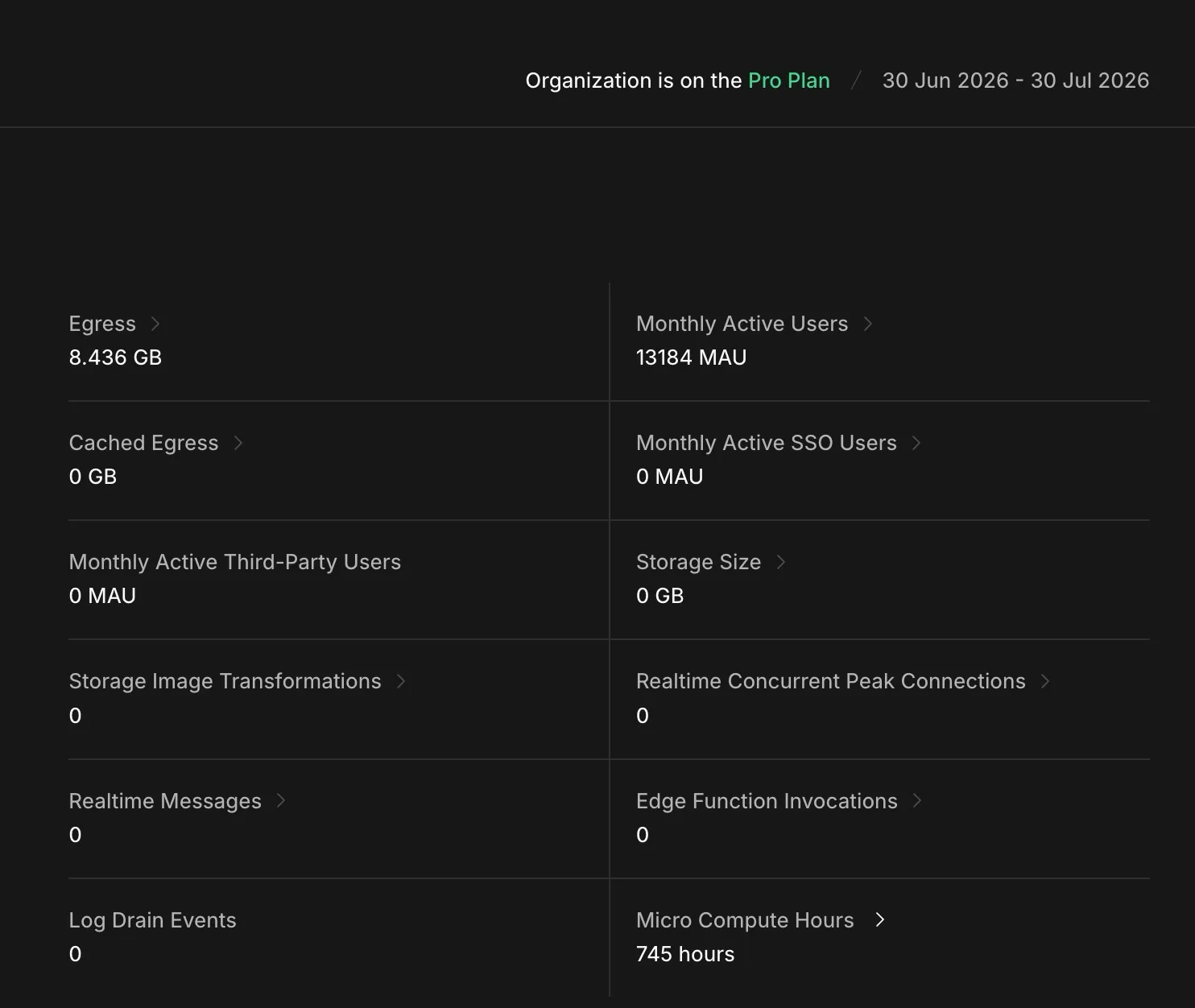
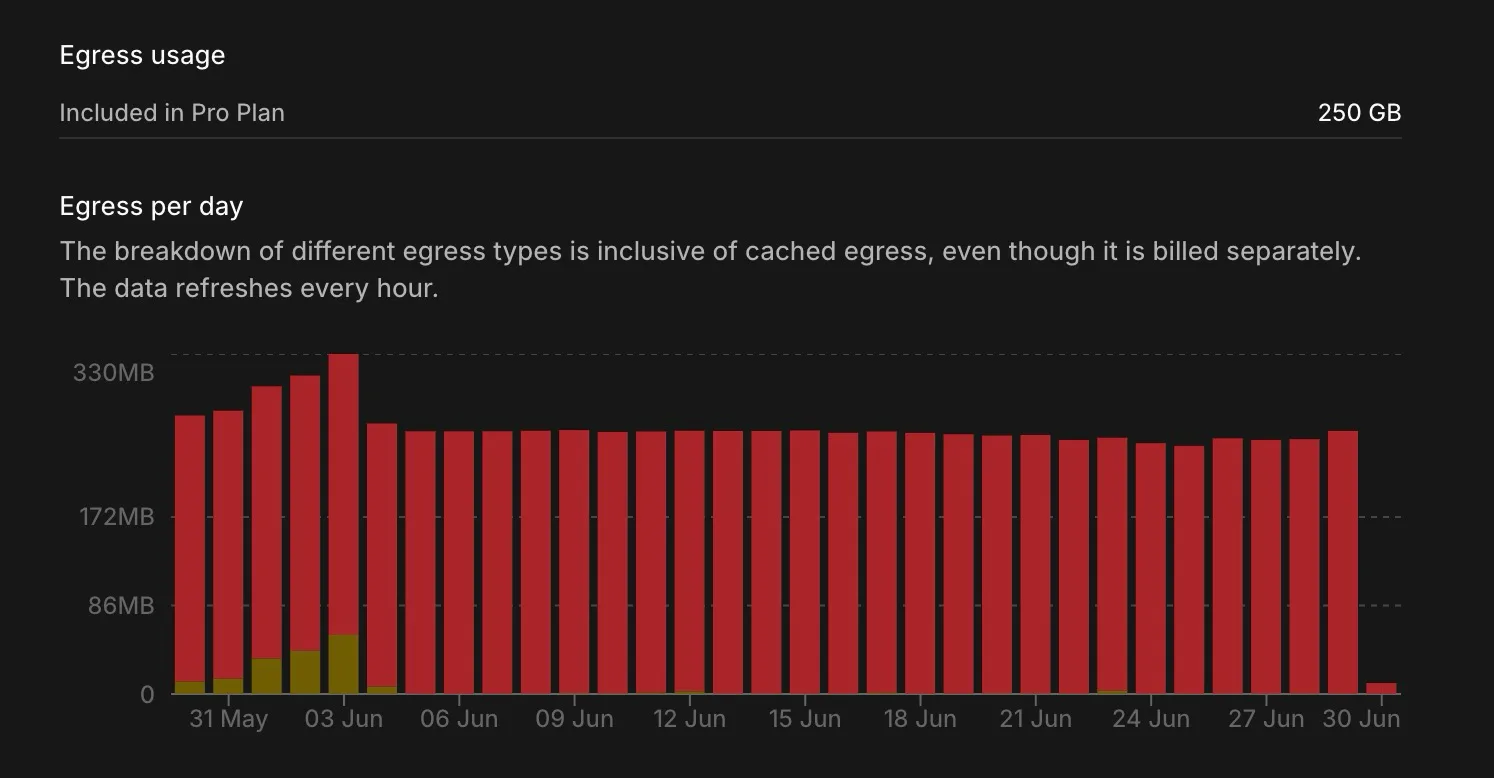
At 13,184 monthly active users on a t4g.micro instance, this project sits comfortably in the $25/month Pro base. MAU is well under the 100,000 allowance, egress used just 8.4 GB of the 250 GB included (3.4%), and the micro compute is covered by the plan's included $10 credit. One honest caveat that keeps the number clean: this workload uses Postgres directly and little else — no Storage, image transformations, Realtime, Edge Functions, or SSO (you can see them all sitting at zero above). So it's a fair read on database-plus-auth cost, but apps that lean on storage, realtime, or edge functions will add usage on top of this baseline.
Scenario 3: Growing SaaS with Traction
Profile: 50,000 MAUs, 20 GB database, 80 GB storage, 500 GB bandwidth, moderate edge functions, dedicated compute.
| Component | Usage | Cost |
|---|---|---|
| Plan | Pro | $25 |
| Compute | 2 vCPU/4 GB dedicated | ~$50 (after $10 credit) |
| Database | 20 GB (12 GB overage) | $1.50 |
| Storage | 80 GB (within 100 GB) | $0 |
| Bandwidth | 500 GB (250 GB overage) | $22.50 |
| Auth MAUs | 50,000 (within 100K) | $0 |
| Edge Functions | 3M invocations (2M overage) | $5 |
| Total | ~$104/month |
At $104 per month for a full backend stack including database, auth, storage, realtime, and serverless functions, this supabase pricing represents strong value. Comparable Firebase usage at this scale would cost an estimated $150 to $250 per month. For a full breakdown of how Supabase and Firebase compare across pricing, features, and developer experience, see our Firebase vs Supabase comparison.
Scenario 4: Scale-Stage SaaS
Profile: 300,000 MAUs, 100 GB database, 500 GB storage, 2 TB bandwidth, heavy realtime, AI edge functions.
| Component | Usage | Cost |
|---|---|---|
| Plan | Team | $599 |
| Compute | 4 vCPU/8 GB dedicated | ~$100 |
| Database | 100 GB (50 GB overage) | $6.25 |
| Storage | 500 GB (400 GB overage) | $8.40 |
| Bandwidth | 2 TB (within Team included) | $0 |
| Auth MAUs | 300,000 (within 500K) | $0 |
| Edge Functions | 10M invocations (9M overage) | $22.50 |
| Realtime | 2,000 peak connections | ~$22.50 |
| Total | ~$759/month |
At this scale, the Team plan pays for itself through the 2 TB bandwidth inclusion alone (which would cost $157.50 in overages on Pro) and the 500,000 MAU ceiling (which would cost $675 in overages on Pro).
Supabase vs Firebase vs Neon vs PlanetScale: Price Comparison
Supabase pricing becomes clearer when compared against alternatives. Here is how the platforms stack up for a typical SaaS application with 50,000 users, 20 GB database, and 500 GB bandwidth.
| Provider | Monthly Cost | Database Type | Auth Included | Storage Included | Best For |
|---|---|---|---|---|---|
| Supabase Pro | ~$100 | Postgres (relational) | Yes (100K MAUs) | Yes (100 GB) | Full-stack SaaS |
| Firebase Blaze | ~$150-250 | Firestore (NoSQL) | Yes (free tier) | Yes (5 GB free) | Mobile apps, simple backends |
| Neon Scale | ~$70-150 | Postgres (serverless) | No | No | Postgres-only, scale-to-zero |
| PlanetScale | ~$60-100 | MySQL (Vitess) | No | No | MySQL-only, branching |
| Self-hosted (Railway) | ~$40-80 | Any | No | No | Full control, custom extensions |
Where Supabase Wins on Price
Supabase wins the total supabase cost comparison for teams that need a complete backend stack. Buying Postgres, authentication, file storage, realtime subscriptions, and edge functions separately from different providers would cost significantly more and add integration complexity.
For a SaaS startup evaluating deployment platforms, Supabase eliminates the need to piece together a backend from multiple services. The auth comparison landscape shows that Supabase Auth alone would cost $50 to $100 per month from a standalone provider at 50,000 MAUs.
Where Supabase Loses on Price
Supabase pricing is higher than alternatives when:
- You only need a database. Neon ($19/month) and PlanetScale ($39/month) offer cheaper pure database solutions without bundled services you may not use
- You need NoSQL. Firebase is purpose-built for document databases and can be cheaper for read-light workloads
- You want maximum control. Self-hosted Postgres on a VPS costs $6 to $20 per month for raw compute, though you absorb all operational overhead
- You need specialized extensions. PostGIS, pgvector with custom configurations, or niche Postgres extensions may require self-hosting
Hidden Costs and Gotchas
Every supabase pricing page looks clean until you encounter these real-world cost traps.
Bandwidth Is the Silent Cost Driver
Bandwidth overage at $0.09/GB is the most common surprise on Supabase bills. Applications that serve images, API responses, or file downloads burn through the 250 GB Pro limit faster than expected.
Example: A marketplace app serving product images to 100,000 visitors per month, each loading 3 MB of images, consumes 300 GB of bandwidth. That is 50 GB over the Pro limit, adding $4.50 per month. Scale to 500,000 visitors and the overage jumps to $112.50.
Mitigation: Place a CDN (Cloudflare, Vercel Edge) in front of your Supabase storage. Cache static assets aggressively. Use image transformation to serve appropriately sized images.
Multi-Project Sprawl
Each Supabase project on a paid plan has a $25 minimum cost. Development, staging, and production environments across multiple products can balloon to hundreds per month before you realize it.
Mitigation: Use Supabase branching (beta) for development environments instead of separate projects. Consolidate services where possible.
Compute Scaling Surprises
Supabase auto-scales compute when your database needs more resources. This is helpful during traffic spikes but can generate unexpected charges if the spike is sustained.
Mitigation: Set usage alerts in the Supabase dashboard. Monitor compute hours weekly. Consider whether dedicated compute at a fixed rate is more predictable than auto-scaling.
Auth MAU Inflation
Auth MAUs count all sign-in events, not strictly unique users. Bot traffic, automated testing, and users signing in from multiple devices can inflate your MAU count beyond actual unique humans using your product.
Mitigation: Implement rate limiting on auth endpoints. Use CAPTCHA for signup flows. Monitor your MAU count against your actual user base.
Edge Function Cold Starts
Edge functions charge for every invocation, including cold starts and failed executions. Functions that crash on invocation still count. Functions that trigger frequently but fail silently accumulate charges without delivering value.
Mitigation: Monitor edge function error rates. Implement proper error handling. Use Supabase's function logs to identify and fix failing functions before they become a cost center.
How to Optimize Your Supabase Cost
Whether you are on the free tier or Team plan, these strategies reduce your supabase pricing without sacrificing performance.
Database Optimization
- Clean up unused data. Delete old sessions, expired tokens, and soft-deleted records. Free tier users: this is how you stay under 500 MB
- Use appropriate data types. Storing UUIDs as text instead of the UUID type wastes 2x the space
- Index strategically. Good indexes reduce query compute time. Bad indexes waste storage. Review your index usage regularly
- Archive old data. Move historical records to cheaper storage. Keep your active database lean
Bandwidth Optimization
- Implement a CDN. Cloudflare's free tier eliminates most static asset bandwidth from your Supabase bill
- Compress API responses. Enable gzip on your API layer. JSON payloads compress 70-80%
- Use image transformations. Supabase's built-in image API resizes on the fly. Serve thumbnails where appropriate
- Paginate aggressively. Return 20 records per page instead of 100. Your users scroll less than you think
Auth Optimization
- Block bot signups. Implement CAPTCHA and rate limiting to prevent inflated MAU counts
- Use session refresh wisely. Long session durations reduce re-authentication events
- Monitor MAU vs active users. If your MAU count is significantly higher than your real user count, investigate the gap
If you are implementing Supabase Auth in a Next.js project and want to get the setup right from the start, follow our complete guide to Supabase Auth with Next.js.
Storage Optimization
- Set file size limits. Reject uploads above a reasonable threshold
- Implement lifecycle policies. Auto-delete temporary files, expired uploads, and processing artifacts
- Compress before storing. Client-side image compression before upload reduces storage and bandwidth costs simultaneously
For teams choosing their ORM and data layer, efficient query patterns directly impact Supabase compute and bandwidth costs. An ORM that generates optimized SQL reduces both response times and egress charges.
Which Supabase Plan Should You Choose?
Choosing the right supabase pricing plan depends on your current stage and growth trajectory.
Choose Free If:
- You are learning Supabase or prototyping
- Your project has fewer than 1,000 users
- Occasional downtime from pausing is acceptable
- You do not need backups or support
- You are building a personal tool or experiment
Choose Pro ($25/month) If:
- You are building a production application
- You have between 1,000 and 100,000 users
- You need daily backups and email support
- You want predictable base costs with usage scaling
- You are a startup or indie developer shipping a real product
Choose Team ($599/month) If:
- You need SSO/SAML for enterprise customers
- Auth MAUs consistently exceed 100,000
- Bandwidth regularly exceeds 1 TB
- You need SOC 2 compliance
- Priority support response times matter for your business
Choose Enterprise If:
- You need a 99.99% uptime SLA
- HIPAA or specific compliance requirements apply
- You need dedicated support and custom configurations
- Your scale requires negotiated limits and pricing
For most SaaS startups, the Pro plan is the right supabase pricing starting point. It covers the first 100,000 users at a cost that scales gradually with revenue. Upgrade to Team when enterprise features or support levels become requirements from your customers, not before.
Conclusion
Supabase pricing in 2026 hits a strong balance between accessibility and scalability. The free tier lets you build and learn. The Pro plan at $25 per month covers most startups through their first 100,000 users. The Team plan unlocks enterprise features when your customers demand them.
The key to managing your supabase pricing bill is understanding where overages happen. Bandwidth, compute scaling, and multi-project sprawl are the three areas where bills grow faster than expected. Monitor your usage dashboard weekly, implement CDN caching for static assets, and consolidate projects where possible.
For teams building SaaS products in 2026, supabase pricing offers the strongest price-to-feature ratio of any managed backend platform. It bundles Postgres, auth, storage, realtime, and edge functions at a price point that standalone providers struggle to match individually.
Start on the free tier to learn. Move to Pro before your first paying customer. Scale to Team when enterprise features become non-negotiable. That is the supabase pricing playbook that matches your infrastructure costs to your revenue growth.
Related Resources
- Neon vs Supabase: Benchmarks, Pricing & When to Use Each
- Firebase vs Supabase: Complete Developer Comparison
- Supabase Row Level Security: Policies That Actually Work
- Supabase MCP Server: AI Integration Guide
- Auth Providers Compared: Clerk vs Auth0 vs Supabase vs Firebase
- Vercel vs Railway: Best Deployment Platform for SaaS
- Prisma vs Drizzle: Which ORM for Your Next.js Project?
- How to Start a SaaS Business: The $0-to-$10K MRR Playbook
- Stripe vs Paddle for SaaS: Payments Compared
- Best SaaS Tools for Startups: The Complete Stack
Frequently Asked Questions
-
As of July 2026, the Supabase free tier includes a 500 MB database, 1 GB file storage, 5 GB egress bandwidth, 50,000 monthly active users, 500,000 edge function invocations, 200 concurrent realtime connections, and up to 2 active projects. Compute is a shared CPU with 500 MB RAM. There are no daily backups, no SLA, and no SSO, and free projects pause automatically after one week of inactivity, which is the limit most teams hit first. Always confirm the current numbers on supabase.com/pricing before relying on them.
-
Supabase costs 0 dollars per month on the Free plan and 25 dollars per month on the Pro plan, which is where most startups run. The Team plan is 599 dollars per month and Enterprise is custom-priced. On paid plans you also pay usage-based overages, mainly bandwidth at 0.09 dollars per GB, extra database compute, and storage beyond the included amount, so a real Pro bill for a SaaS with 10,000 to 100,000 users typically lands between 25 and 500 dollars per month depending on traffic and realtime usage.
-
The Supabase free tier allows up to 2 active projects per organization. Free projects are paused after one week without API requests, and a paused project does not count toward the active limit until you resume it. If you need more than two always-on projects, you must upgrade to the Pro plan, which allows unlimited projects billed from 25 dollars per month each.
-
The Supabase free tier is generally not suitable for production applications. The 500 MB database limit, 5 GB bandwidth cap, 200 concurrent connection ceiling, and automatic project pausing after one week of inactivity make it unreliable for live products. Supabase officially recommends the Pro plan for production deployments because it includes daily backups, higher limits, and email support. Some indie developers run low-traffic side projects on the free tier with under 5,000 users by optimizing queries and avoiding inactive periods, but this approach carries risk of unexpected pauses and data access disruption.
-
For a SaaS startup with 10,000 to 100,000 users, Supabase typically costs between 25 and 500 dollars per month on the Pro plan. The base Pro plan starts at 25 dollars per month and includes 100,000 MAUs, 8 GB database, and 250 GB bandwidth. A startup with 50,000 MAUs, 10 GB database, and 500 GB bandwidth should expect roughly 100 to 200 dollars per month including compute and bandwidth overages. For startups approaching 100,000 users with realtime features, costs can reach 300 to 500 dollars per month depending on connection counts and edge function usage.
-
Exceeding Supabase free tier limits triggers soft enforcement rather than immediate charges. The database rejects write operations beyond 500 MB. Storage uploads stop at 1 GB. Bandwidth requests return errors after 5 GB is consumed. Realtime messages are dropped after the monthly cap. Projects also pause automatically after one week of inactivity. Your data is retained when a project pauses and you can resume manually, but there is no guarantee of uptime. The only way to remove these limits is upgrading to the Pro plan.
-
Supabase offers more predictable pricing than Firebase because of its tiered structure with clear base costs. The Pro plan at 25 dollars per month includes 8 GB Postgres database, 100 GB storage, and 250 GB bandwidth. Firebase uses purely usage-based pricing on the Blaze plan where costs scale with every read, write, and data transfer operation. For mid-scale SaaS applications with 100,000 users, Supabase typically costs 30 to 50 percent less than Firebase. Firebase can be cheaper for very low usage applications under 50 dollars per month, but costs escalate unpredictably with high read volumes.
-
For most teams, Supabase Pro at 25 to 100 dollars per month is comparable or cheaper than self-hosted Postgres when you factor in total cost. An AWS RDS db.t3.medium instance with 50 GB storage costs roughly 80 dollars per month before adding load balancers, backups, and bandwidth charges. Supabase bundles authentication, file storage, realtime subscriptions, and edge functions into the price, which would require separate services on AWS. Self-hosting becomes more cost-effective only when you need heavy customization, specific Postgres extensions, or are running at very high scale where dedicated infrastructure makes sense.
-
The most common hidden costs on Supabase include bandwidth overage at 0.09 dollars per GB after the included amount, compute scaling during traffic spikes that bills beyond the base 10 dollar credit, storage fees at 0.021 dollars per GB after the included 100 GB on Pro, and edge function invocations that charge even for failed or cold start executions. Multi-project setups multiply the 25 dollar per project base cost. Auth MAU counts include all sign-in events rather than unique users, meaning bot traffic can inflate billing. Monitoring your usage dashboard weekly prevents surprise charges.
-
Start on the free tier for prototyping, learning, and building your MVP if you have fewer than 5,000 expected users. Upgrade to Pro before going to production. The 25 dollars per month Pro plan adds daily backups, higher limits, email support, and eliminates the risk of project pausing. For any SaaS product you plan to charge money for, the Pro plan is the minimum viable infrastructure. The cost of one hour of downtime from a paused free tier project during a demo or user onboarding far exceeds the 25 dollar monthly investment.
-
Supabase does not charge for inactive projects. On the free tier, projects pause automatically after one week of inactivity and incur zero costs while paused. On paid plans, compute hours are only counted for active instances. Paused projects retain your data and can be resumed on demand. This makes Supabase a reasonable choice for staging environments or seasonal projects where you want to avoid ongoing costs during quiet periods.
Join 50k+ subscribers
Web dev, SaaS, growth & marketing. Weekly.
Keep Learning
More articles you might find interesting.
